
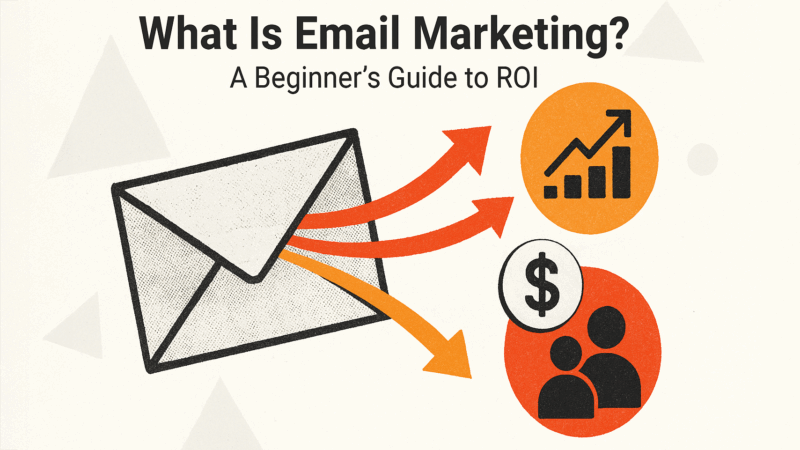
Email marketing allows you to send targeted messages directly to your audience.
No algorithms. No rented platforms. Just your message in your audience’s inbox.
The catch?
To do it well, you need to respect permission-based marketing, learn how to segment audiences, and master automation.
In this article, we cover what email marketing is and how it works so you can send ethical, effective emails that convert leads into buyers. We’ll also include examples of campaigns and automations to inspire your email marketing workflows.
What is email marketing?
Email marketing is a permission-based channel that involves sending targeted messages to specific audiences who have opted in to your marketing. Email marketing offers direct communication with subscribers. And—crucially—it provides ownership of your subscriber list.
Unlike newer marketing channels like social media, email doesn’t depend on unpredictable algorithms to put your content in front of your audience. And it tends to be less invasive than SMS.
With email marketing, you can use segmented audiences to send the right message to the right people. These targeted email campaigns allow marketers to achieve goals like:
- Acquiring new leads
- Nurturing relationships
- Converting prospects
- Retaining customers
- Re-engaging users
Even better?
A lot of email marketing can be automated.
How email marketing works
Before sending emails, you need two essential components: subscribers and an email service provider (ESP) such as Mailchimp, Klaviyo, or ActiveCampaign.
This section covers a brief view of what an email workflow looks like, how you gain subscribers, and how to use your ESP.
1. Users opt in to your email marketing
Email marketing is a permission-based channel. It’s most effective when the people you message have opted in to receive emails.
Why?
Because people who opt in are more likely to want to hear from you and are therefore more likely to engage.
A small email list of people who want to hear from you is infinitely better than a huge database of people who don’t know you or don’t need your product or service.
Note: For some locations, opting in is a compliance requirement, not an option. This is covered in more detail in the “Compliance, Privacy, and Deliverability Best Practices” section.
Virtually every email marketing software provider is permission-based. The software requires that you get opt-ins from subscribers. And many recommend a double opt-in where a new subscriber opts in at the form, then again within the first email.
Email opt-ins typically occur on your website when visitors sign up for a newsletter, discount code, or a gated lead magnet (like a white paper). Alternatively, users who purchase something or submit a contact form may opt in to receive marketing emails by checking a box.
2. Your email software stores subscriber data
As soon as someone opts in, you should store their email address in a secure location. Ideally, this takes place in one of three places:
- Content management system (CMS), such as WordPress
- Customer relationship management (CRM) system like HubSpot
- Email service provider, such as Mailchimp
Some CMS platforms (e.g., Squarespace or Wix) can automatically store emails gained from website forms. Others (e.g., WordPress) require plugins.
CRMs and ESPs generally require a website integration to collect and store email addresses.
3. You send or automate email campaigns
Once you build an email list, you’re ready to begin sending campaigns. Even if your email list is small and you want to send text-only emails, you should still use email marketing software.
Email software uses spam and deliverability filters to make the successful delivery of bulk emails more likely.
As a marketer, you can send one-off campaigns (broadcasts) or automated sequences triggered by user behavior, audience segmentation, or lifecycle stages.
4. Your email software tracks performance
Email marketing is highly measurable. The data points you track will depend on the goal of the email, but marketers typically look at metrics like:
- Email opens
- Clicks within the email
- Replies
- Conversions such as webinar signups, purchases, or calls booked
You can use data from email campaigns to iterate on messaging and optimize future campaigns.
Common types of email marketing campaigns
From newsletters to transactional emails, every email serves a purpose. Here are some common types of email marketing campaigns to consider for your strategy.
Promotional emails
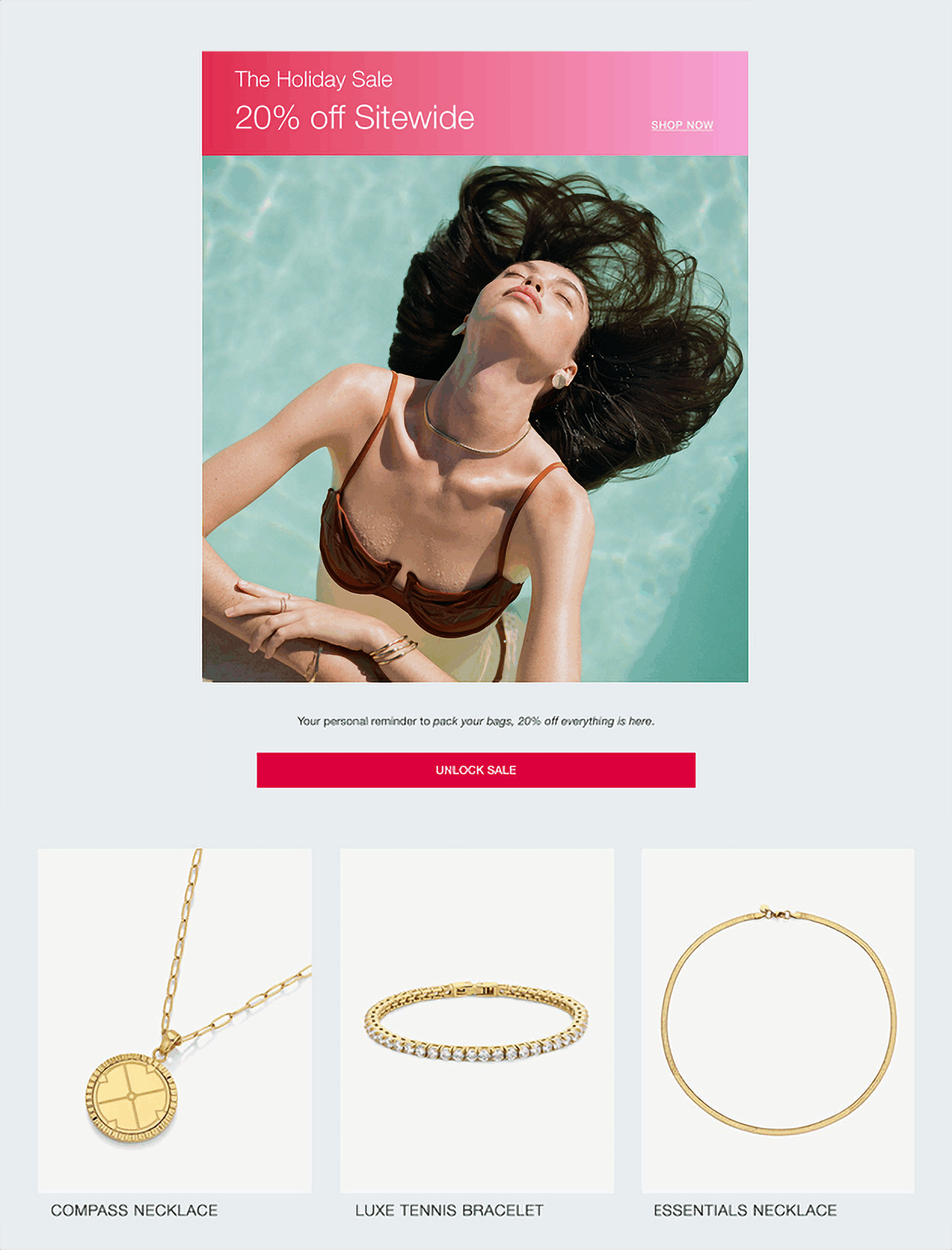
Promotional emails typically highlight a new product or special offer. They’re designed to inspire a sale or evoke interest in a promotion or product.
This promotional email example from a jewelry brand offers a 20% sitewide discount.
Lifecycle and behavior-based emails
Lifecycle and behavior-based emails are sent in response to specific triggers and are designed to prompt a specific action based on a trigger.
Say a customer signs up for your email list. The first email they receive might be a welcome series that introduces your brand.
Other examples of behavior-based emails include:
- Cart abandonment emails target people who add an item to their cart but don’t complete the purchase. This type of email encourages users to return to the site and complete their purchase.
- Reengagement flows target people who haven’t engaged with your emails. To generate engagement, you might send an email with an offer or a prompt like: “Are you still interested?” to try and motivate action.
- Win-back flows target people who haven’t bought in a while. They typically target customers who are at risk of churning.
- Post-purchase follow-ups target people who purchased from your business. They may include a prompt to review the purchase or an upsell. For example, you might upsell someone who bought a tennis racket, encouraging them to add tennis balls or new activewear to their order.
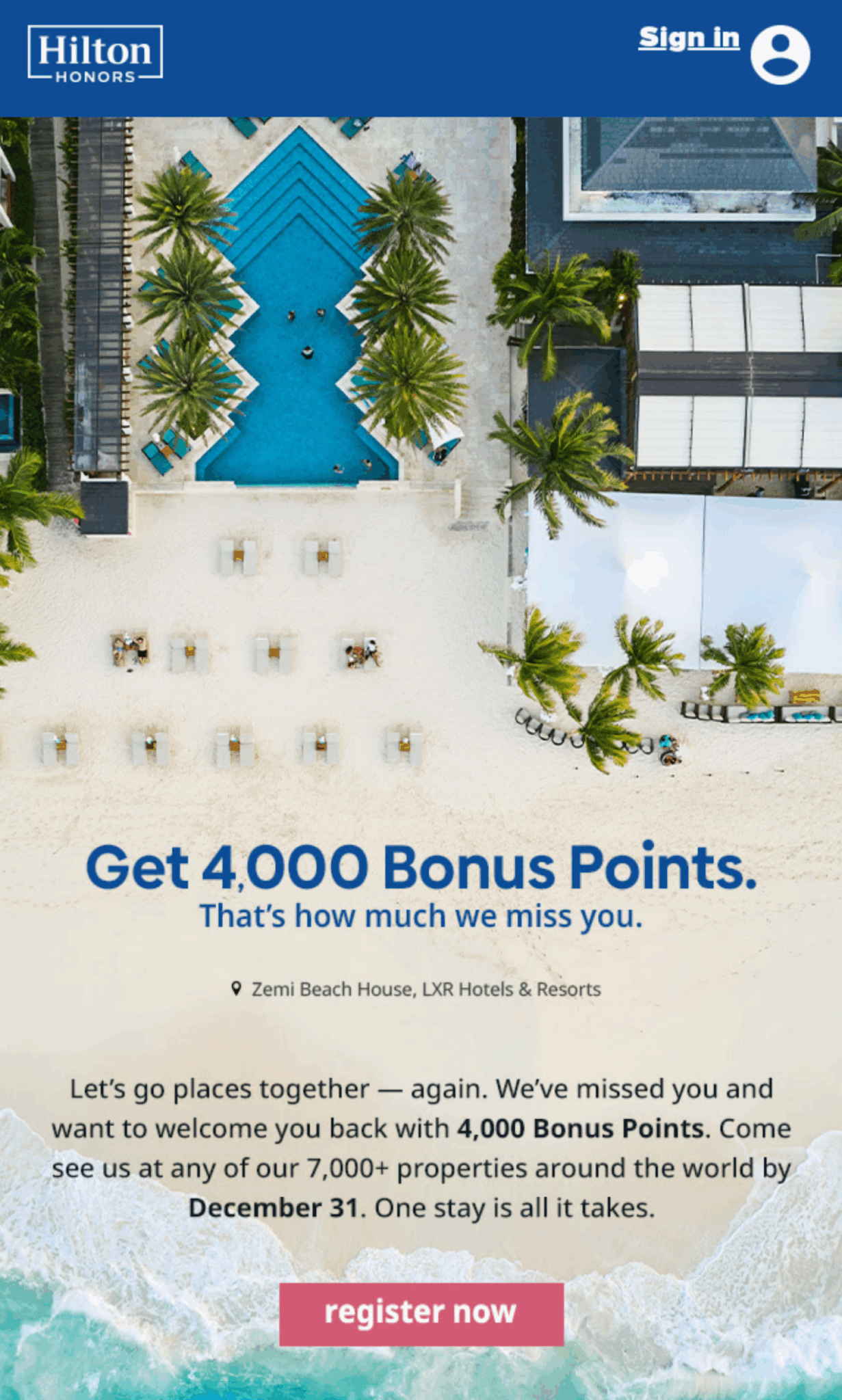
Here’s a very effective annual win-back email from Hilton:
Transactional emails
Transactional emails confirm an action or an update. For example:
- Order confirmations
- Receipts
- Shipping updates
Don’t underestimate the power of transactional emails for email marketing.
They’re extremely powerful.
Why?
Transactional emails are highly likely to be opened because they have a guaranteed benefit to the recipient (confirmations or updates). They’re also timely and relevant (received, as expected and wanted, at the time of purchase).
65-70% of confirmation emails are opened, and their click-through rate (CTR) is 85% higher, according to ExpertSender.
Here’s an example of a transactional email from Lenovo:
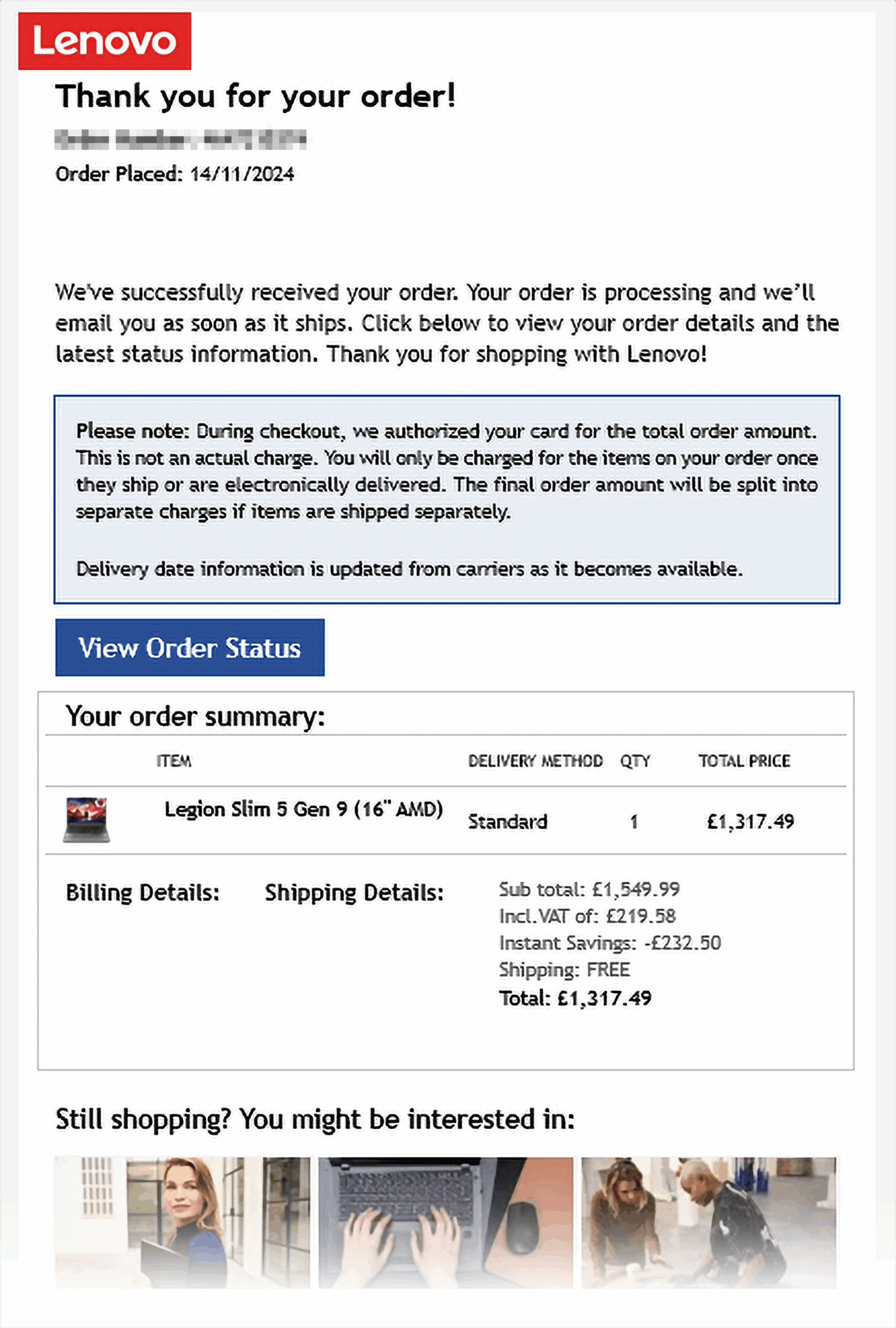
Lenovo prioritizes the most important details (the order confirmation and status), then has the following elements:
- Related products that complement the purchase of a new laptop. This might encourage the purchaser to return to the website for an upsell
- A call-to-action for purchasers to join the community, which reinforces the brand and its people-first values
- A call-to-action for customer support, inviting users to ask questions and emphasizing that the brand is there to help
Newsletters and content updates
Newsletter emails and content updates are educational, editorial, or community-building content. They also drive long-term engagement and customer loyalty.
Often, newsletters and updates don’t try to sell anything. Instead, they may feature links to helpful articles or company updates.
For example, you might link to a case study in a newsletter—a celebration rather than a hard sell. Think of your email newsletters as conversations.
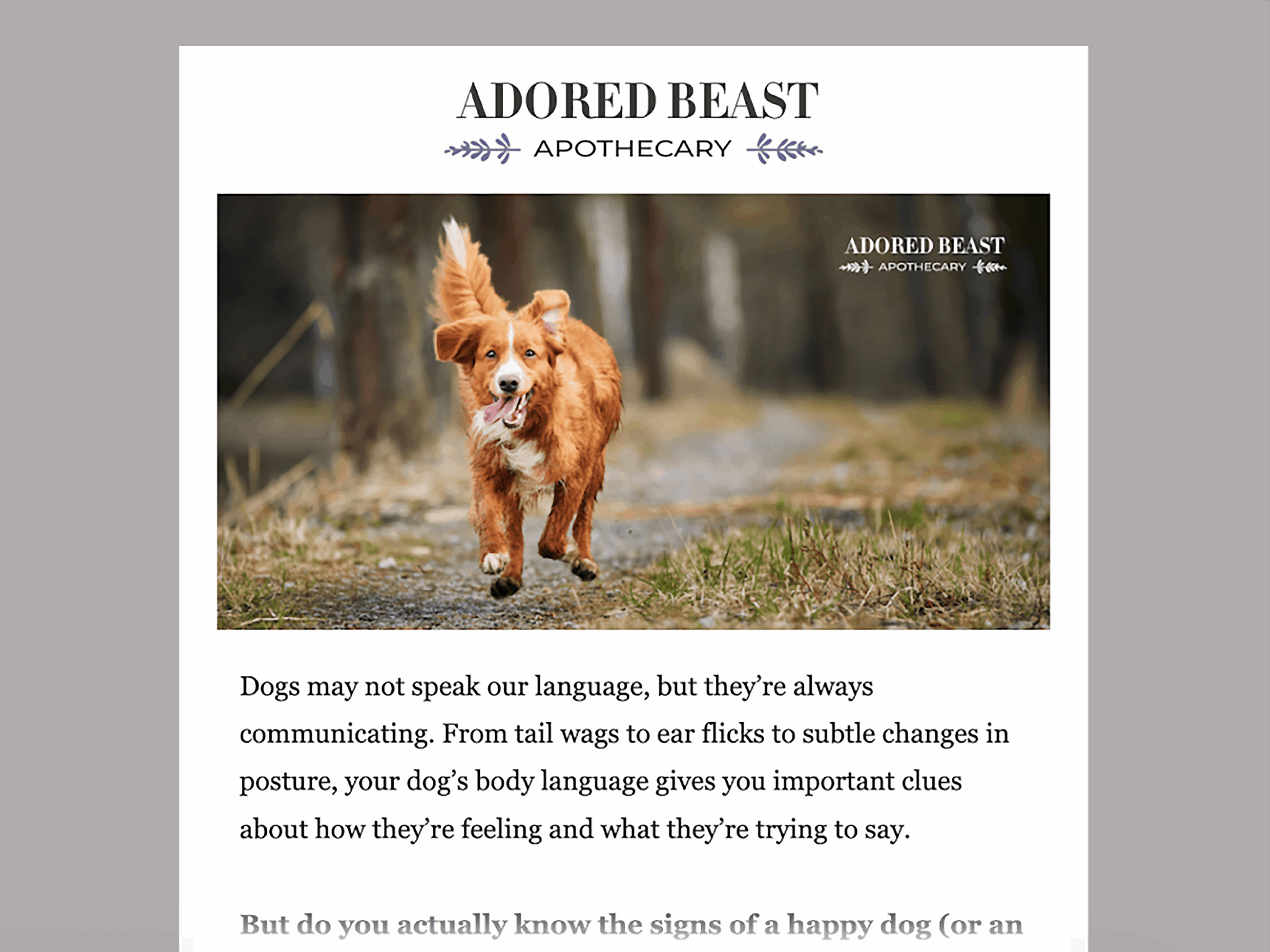
Here’s an example of a newsletter:
Benefits of email marketing for brands and businesses
Email marketing offers many benefits that channels like SMS, social media, and influencer marketing don’t.
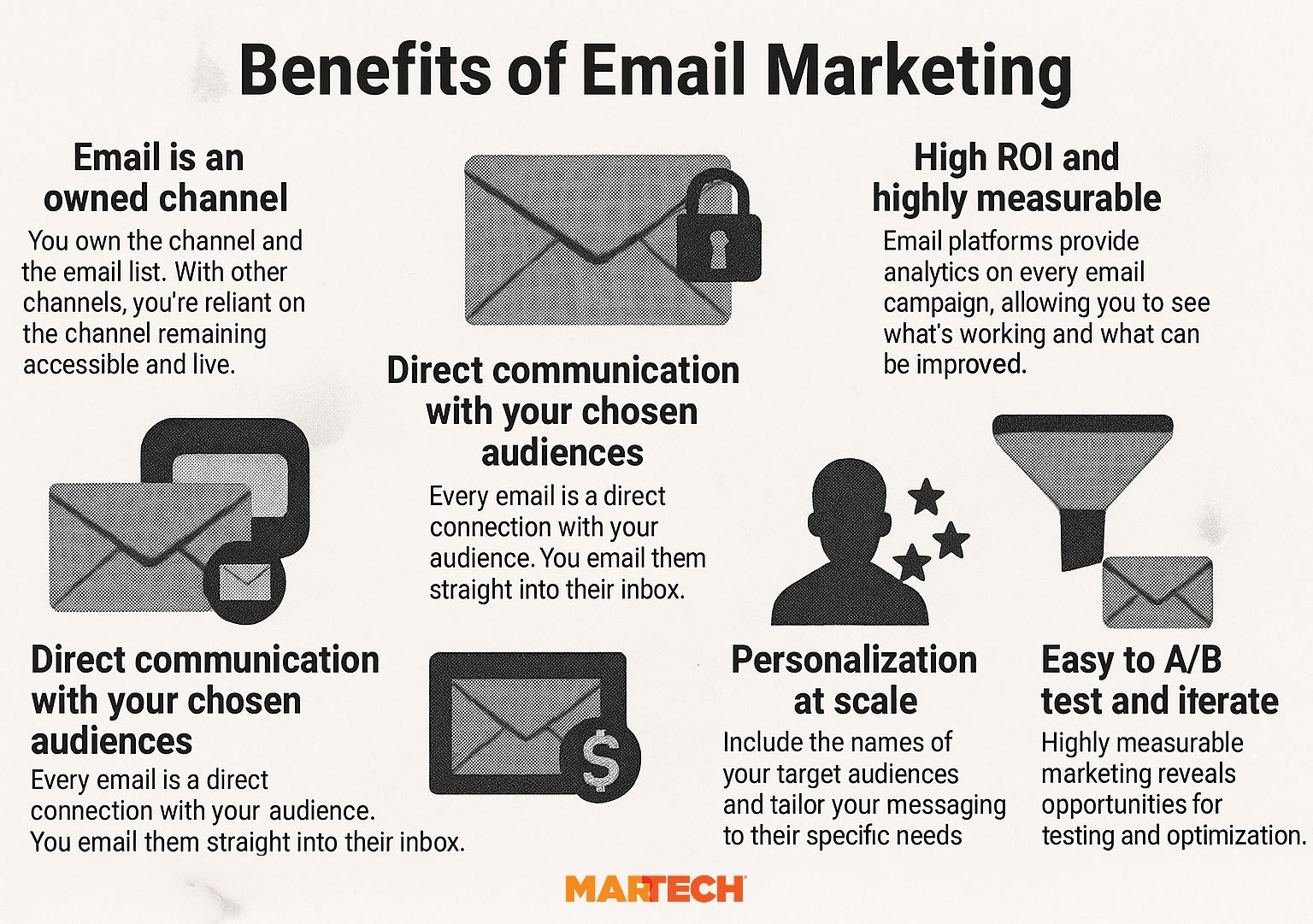
Here are some of the key benefits that email marketing offers brands and businesses.
Direct, owned channel
Unlike paid media or social media, email marketing doesn’t depend on third-party algorithms. Instead, you own the channel and the email list. With other channels, you’re reliant on the channel remaining accessible and live.
Every email creates a direct connection with your audience. You email them straight into their inbox.
And with audience segmentation, you can create targeted audiences based on specific needs or behaviors. Then, you can tailor your messaging accordingly.
High ROI and measurable performance
When you send email campaigns, your software tracks performance via metrics like:
- Revenue generated
- Average order value
- Orders
- Click rate
Here’s what the data looks like in Mailchimp.
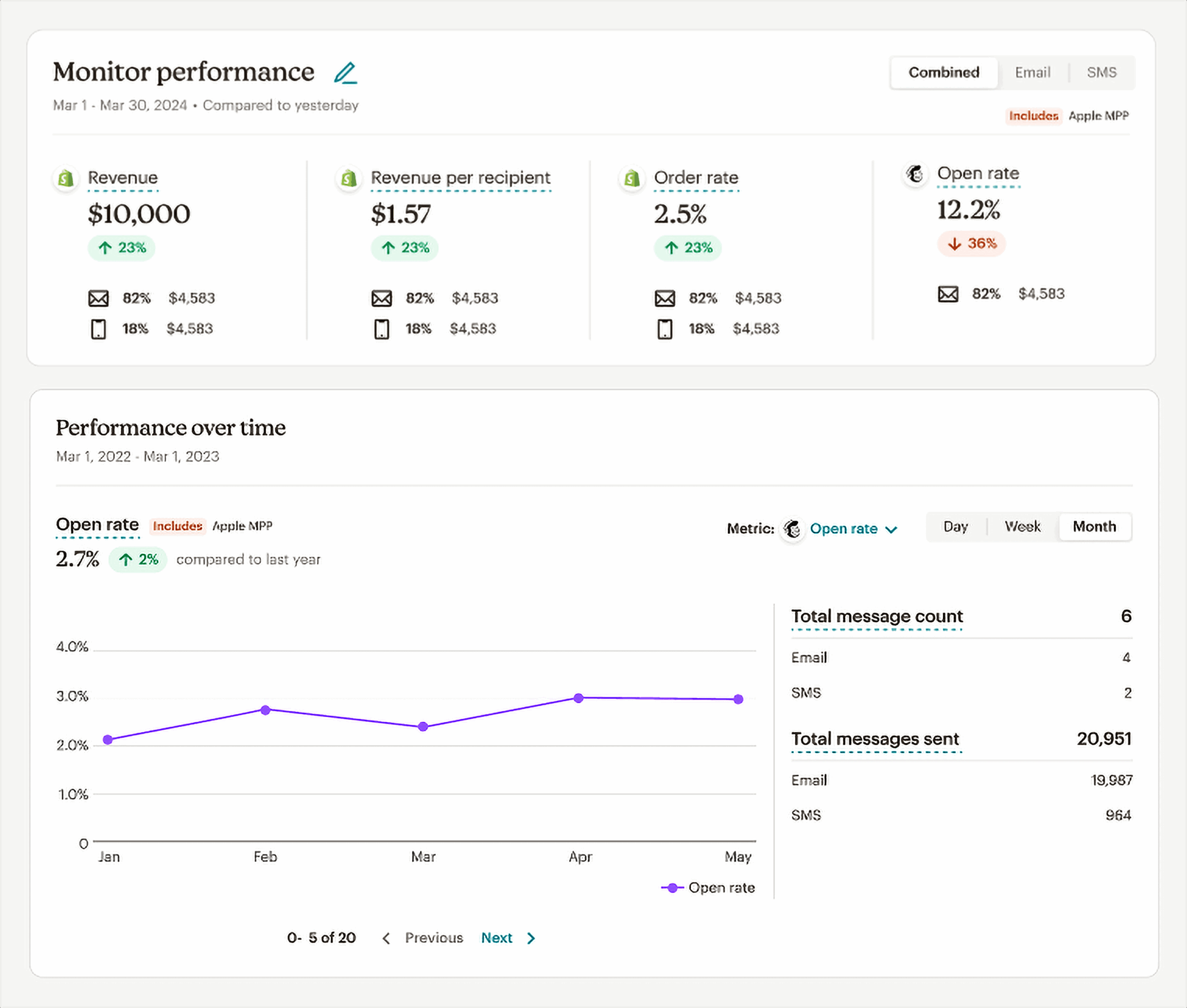
For every $1 invested, email marketing makes as much as $36, according to the Litmus State of Email Report.
Personalization at scale
Personalizing emails is key if you want to improve customer engagement and sales.
Nearly three-quarters of marketers report that targeted personalization increases customer engagement. On average, using personalized experiences leads to a 20% increase in sales, according to Campaign Monitor.
Yet email personalization isn’t just about adding a first name.
Personalization covers:
- Time zone and send times: Sending emails at the times your subscribers are most likely to open
- Custom subject lines, messaging, and CTAs: Tailoring content to meet the specific needs of the target audience
- Behavioral triggers: Sending emails based on past purchases or behavior or using dynamic content to add product recommendations based on user behavior
Useful across all funnel stages
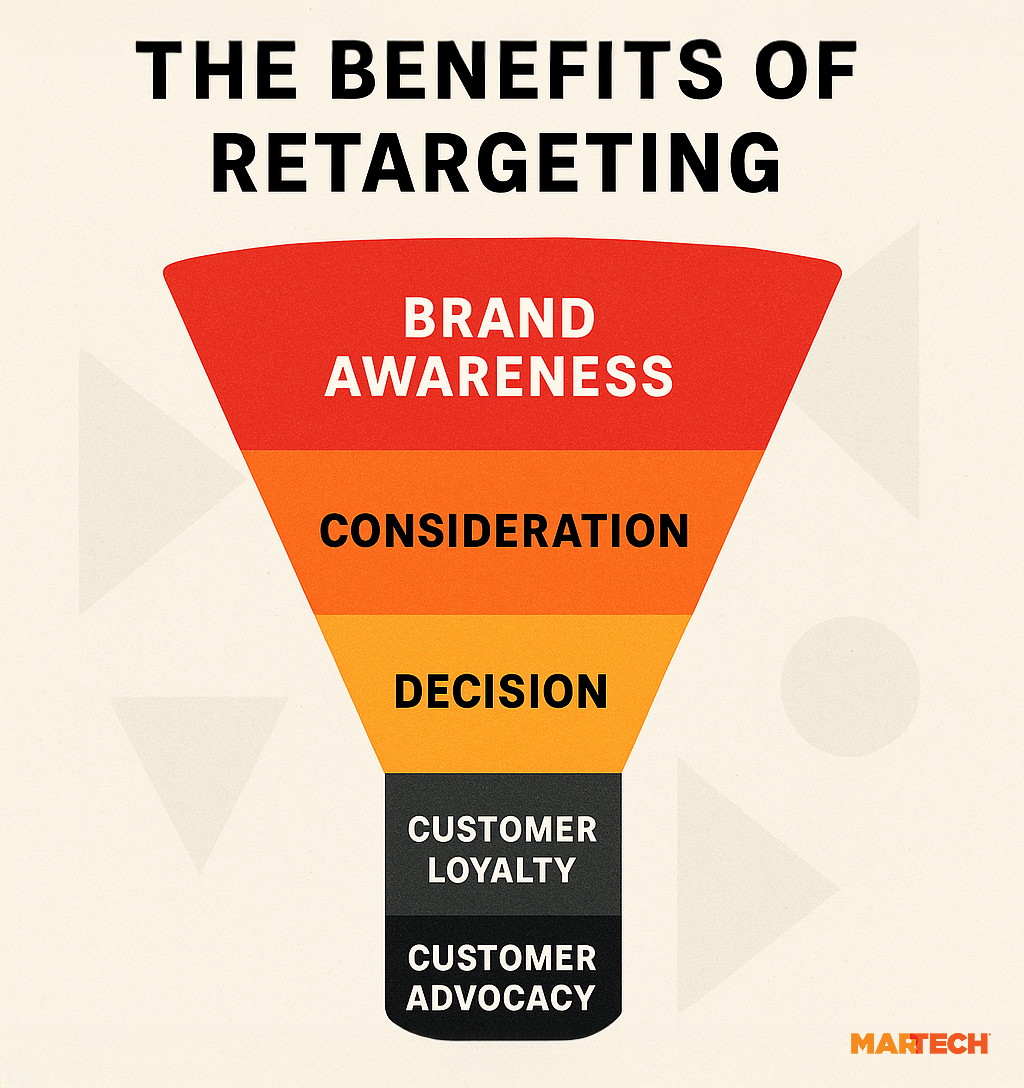
An email marketing funnel typically consists of five stages. Each stage can help you decide which type of email campaign is most appropriate for users, depending on where they are in the buyer journey:
- Awareness: Educate and inform recipients by sharing blog posts, brand stories, or industry insights
- Consideration: Help subscribers explore and weigh their options by sending emails with product benefits, case studies, or testimonials
- Decision: Close the deal by sharing limited-time promotions or offering demos and consultations
- Customer loyalty: Encourage post-purchase engagement by asking for reviews or inviting customers into your community (e.g., a Facebook group)
- Customer advocacy: Prompt loyal customers to share your brand with others by offering referral programs or discount codes for friends
Easy to A/B test and iterate
You don’t have to guess which email messaging or campaign format will perform best. Instead, you can A/B test multiple emails to see which one performs better.
Also called split testing, A/B testing means creating two or more versions of the same email. Each version is identical—except for the variable you want to test.
For example, you might write two subject lines to see which receives the most opens. You send each version to a percentage of subscribers. Then, the subject line with the highest open rate wins and is rolled out to the rest of the subscribers.
You can split test subject lines, design choices, button styles and colors, calls to action (CTAs), send times and dates, and more.
Dig deeper: Optimizing your email program: Finding sweet spots and tipping points
Building and growing an email list (the right way)
To build and grow an email list, you need a way to allow subscribers to opt in—or actively choose to receive your marketing emails.
The key to earning an opt-in is an offering so good that website visitors can’t resist it. You can earn subscribers by offering:
- High-quality lead magnets and gated content include valuable information that isn’t otherwise freely available on your website. Like HubSpot’s marketing trend reports.
- Newsletter signup forms can capture engaged users while they’re browsing your site. We do this on MarTech. Check the right sidebar, and you’ll see an email signup.
- Post-purchase opt-ins ask users to check a box to receive marketing emails as well as their order confirmation details. So you can turn them into repeat customers.
Once you’ve got an email list, you need to manage it. This is known as list hygiene—or cleaning your email database.
List hygiene consists of:
- Removing inactive users to increase your engagement metrics and avoid bothering people with emails they’re not engaging with
- Managing email bounce rates to improve deliverability and improve your sender reputation
It’s also important to comply with regulations for every subscriber. Which can become complicated as different locations have varying rules and expectations regarding email marketing.
Many European countries, for example, have the General Data Protection Regulation (GDPR), which protects consumers from being targeted by brands without their permission.
Regardless of these regulations, however, an opt-in is best practice. It ensures that those receiving the emails want to hear from you.
As a permission-based channel, email marketing isn’t compatible with email scraping or buying cold email lists.
These tactics can damage your sender reputation and hurt your email deliverability rates. When recipients consistently ignore or mark your emails as spam, your domain is viewed as untrustworthy. This can cause your emails to go to spam.
Audience segmentation for maximum engagement
One of the most powerful features of email marketing is the ability to segment your audience. Which involves dividing subscribers into smaller groups based on shared interests, demographics, or behaviors.
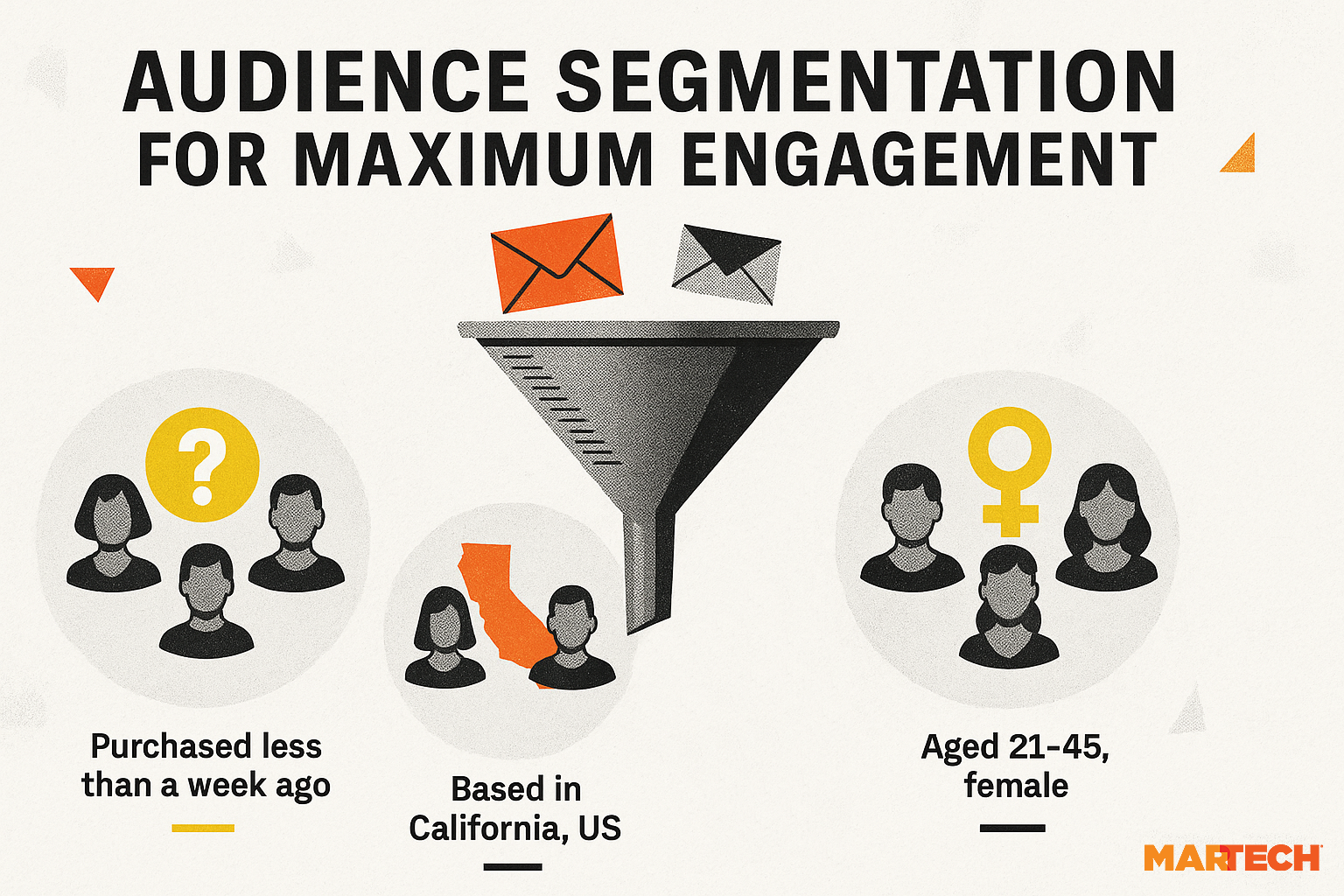
Here are some common segmentation tactics:
User behavior
User behavior segmentation involves dividing subscribers based on actions like:
- Past purchases: Incentivize those who already bought something to purchase again
- Products browsed or added to cart: Reengage those who show active interest in your offering
- Clicks on certain email links: Identify users who have expressed interest and engage them with related content
For example, you can target everyone who clicked the link in an email but didn’t buy. Consider sending them an incentive to complete their purchase.
Demographics
Demographic segmentation involves separating audiences based on data like:
- Age
- Gender
- Location
- Job title or industry
For example, a SaaS company might send ROI-focused case studies to executives and technical implementation guides to IT managers—tailoring the content to the needs of each role.
Funnel stage
Funnel stage segmentation involves sending specific messages and content to people at each step in their customer journey.
For example, a SaaS company might send software comparison guides or case studies to leads in the consideration stage. And it might send onboarding tutorials to new customers who signed up for a free trial.
Engagement score
Some ESPs provide an engagement score to help you identify your most engaged subscribers.
Mailchimp’s engagement score is made up of engagement metrics like:
- Activity within your emails, with clicks being most important
- Time subscribed, or how long someone has been on your list
With these data points, Mailchimp assigns four levels of engagement:
- New
- Rarely
- Sometimes
- Often
If you separate your audience by engagement, you can make data-driven decisions.
For example, your most engaged email subscribers may be receptive to receiving more emails. You could trial more frequent campaigns or promotions with that segment.
Email personalization strategies
With a clean, segmented email database, you can start testing personalization strategies.
For example:
Merge tags
Merge tags allow you to input personalized or dynamic elements into your email.
If you have a complete database with first names and last names, you might include a merge tag that looks like this:
Hi {{FirstName}}
Using the data available in your database, the email provider will update {{FirstName}} with the corresponding data.
“Hi {{FirstName}}” becomes “Hi Zoe.”
It’s a simple way to make emails feel more tailored.
Dynamic blocks
Dynamic blocks are elements that automatically change in response to user behavior.
Say you want to target a specific segment, such as those who added an item to their cart but didn’t purchase. When you add a dynamic block to the email, it automatically displays the item each subscriber was interested in.
Logic-based modules
Logic-based modules are sections or elements that appear based on specific criteria.
For example, if a subscriber is a new customer, you might show them a welcome offer. If the subscriber is an existing, engaged customer, you might show them a loyalty discount.
Email marketing automation and workflows
Email marketing automation and workflows help you scale your efforts without requiring manual work for every email. Automated sequences allow your brand to engage and nurture subscribers at the right moment with the right messaging.
Benefits of email marketing automations and workflows include:
- Subscribers receive timely emails without you having to send them manually. For example, an email with a discount code automatically appears in new subscribers’ inboxes, as part of a welcome series.
- Personalization at scale, as you can tailor emails based on rules and logic. For example, an abandoned cart triggers an email after a certain amount of time, reminding the subscriber about the item in their cart.
- Nurturing leads and building relationships is essential because timely and efficient communication is key to effective communication. Plus, nurturing leads improves email performance and conversions.
Automation can nurture entire journeys. For example, you can send a welcome series to all new subscribers, triggering five emails without needing to complete steps manually.
Here’s what an automated welcome sequence might look like:
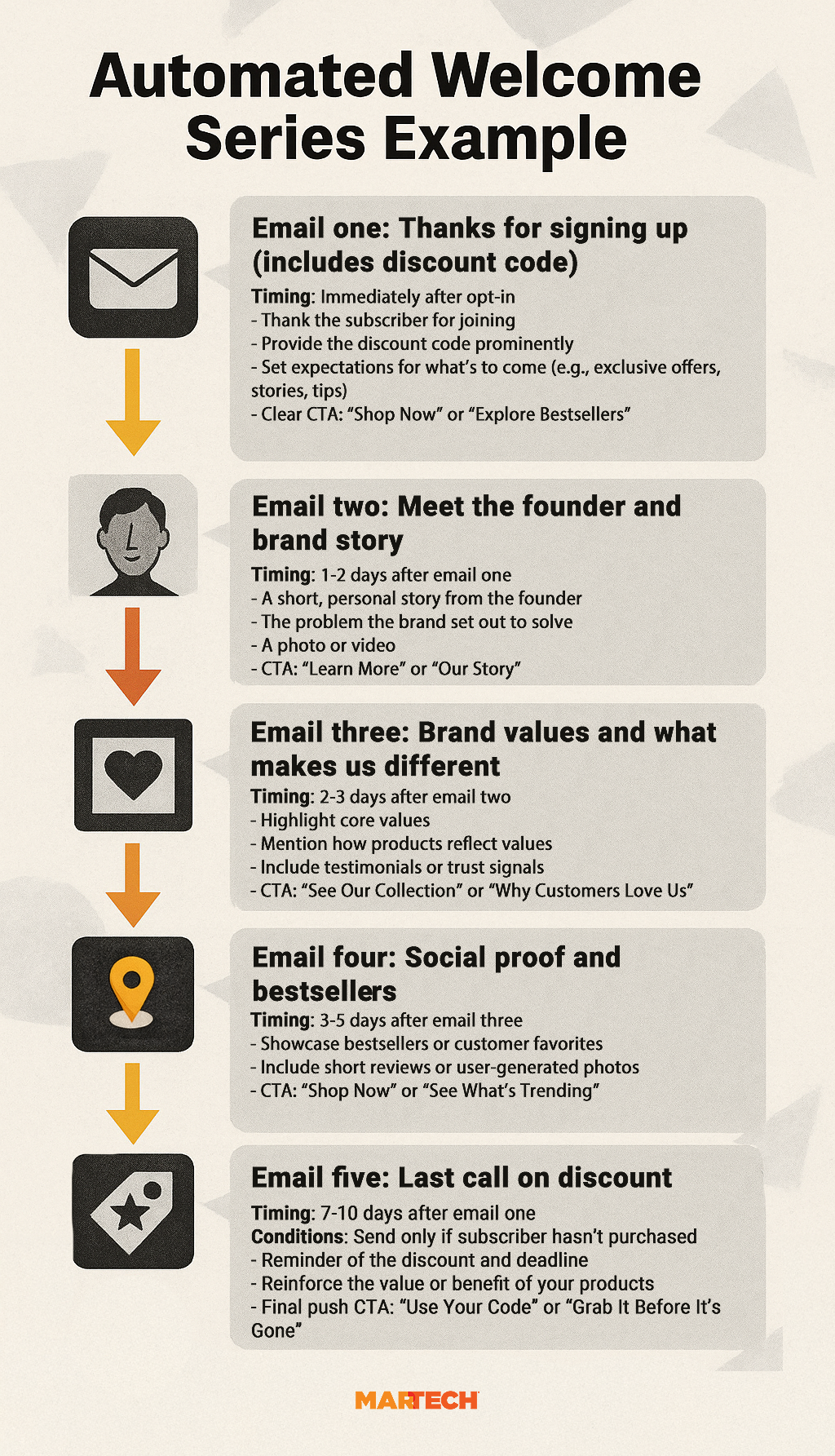
An automated email workflow can trigger the moment someone joins your email list. Then, you can send a sequence of emails at specified times over a week or two.
You don’t want to overwhelm new subscribers. Instead, space them out over a period of time.
ESPs record data in real time—and they can use it to send emails based on specific logic.
For example, your ESP can use abandoned cart data to score the lead and send a cart abandonment email after a predetermined amount of time. Omnisend recommends sending the first email in this series within the hour.
Plus, you can set multiple workflows to run simultaneously.
Suppose your subscriber adds an item to their cart after receiving the third email in the welcome series. Then, they abandon the cart. In this case, the automated abandoned cart email can begin without interrupting the welcome flow.
Your logic might look like this:
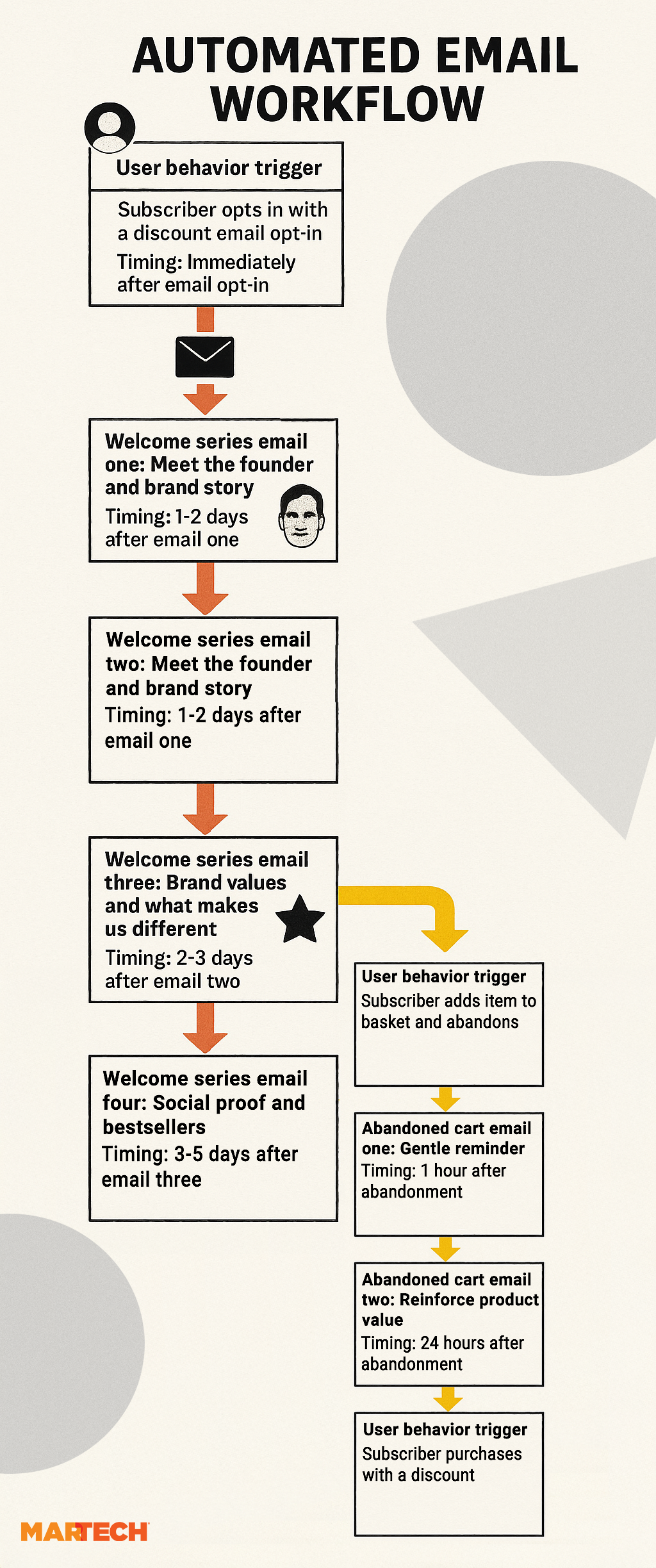
If the abandoned cart email was successful, conditional logic would stop the welcome series at email four. There would be no need to send email five (the discount reminder) because the subscriber would have already purchased.
If the subscriber didn’t purchase, however, the sequence could continue with more emails within the abandoned cart and the welcome series.
Welcome series and abandoned cart sequences are only the beginning. You can use automated workflows for a range of emails, such as:
- Product onboarding
- Subscription renewals
- Post-purchase follow-up
- Review or testimonial requests
- Back-in-stock alerts
- Upcoming launches or promotions
ESPs like these can handle email automations and workflows:
- Klaviyo is best suited for ecommerce and is known for its integrations with Shopify
- HubSpot is best suited for B2B businesses already using HubSpot CRM
- Mailchimp is best for beginners and small businesses, as it’s one of the more user-friendly options
- ActiveCampaign is best suited for audience segmentation and conditional logic, making it ideal for advanced automations
Compliance, privacy, and deliverability best practices
A successful email marketing campaign reaches the largest possible percentage of intended email subscribers possible.
To achieve high delivery rates, email people who want to hear from you (i.e., those who have opted into your list) and follow email best practices for compliance, privacy, and delivery.
Email compliance requirements
All email marketers must adhere to email compliance and regulations, which vary based on the location of your subscribers.
You need to know about:
GDPR
GDPR is a regulation that applies to countries in the European Union (EU) and others like the UK.
GDPR requires that businesses:
- Obtain explicit, informed consent before sending marketing emails
- Be clear about how subscriber data is collected, stored, and used
- Allow users to easily access, update, or delete their data
- Include clear unsubscribe links in every marketing message
CAN-SPAM Act
The CAN-SPAM Act governs email marketing in the United States. Unlike GDPR, CAN-SPAM focuses on making an opt-out available, rather than requiring an opt-in. Which means under the CAN-SPAM Act, you can send emails without prior consent, but you must respect the opt-out option.
To comply with CAN-SPAM, you must:
- Clearly identify the message as an advertisement or promotional
- Include a valid physical postal address
- Provide a working unsubscribe link, and honor opt-out requests within 10 business days
- Avoid deceptive subject lines or headers
CASL
CASL applies to emails sent to recipients in Canada. It’s one of the strictest anti-spam laws in the world.
CASL requires:
- Express or implied consent before sending commercial emails
- A clear explanation of why the person is receiving the email
- A clear and easy way to unsubscribe
- Inclusion of your contact information and physical mailing address
Under CASL, email marketers must document consent. Violations can lead to significant penalties.
Compliance best practices
Following these email marketing compliance guidelines may be required in some areas, but they’re also best practices for building and maintaining an engaged email list.
Read up on the rules that apply, and don’t neglect these best practices:
- Have a clear opt-in
- Make it easy to unsubscribe
- Include your mailing address
- Include your privacy policy
Effective email marketing is about respecting your audience and providing high-quality content to those who truly value it.
Deliverability basics
You can’t run successful email marketing campaigns if subscribers don’t receive your emails.
List hygiene is a good starting point for improving deliverability. But there are also technical steps you should take to ensure your emails land in inboxes and not spam folders:
- Avoid spam traps: Don’t purchase email lists or send emails to addresses that you don’t know are verified. Spam traps are emails set up to identify senders who send emails to non-existent addresses. If you buy a list, you don’t know if the emails are spam traps or not.
- Set up Sender Policy Framework (SPF): Publish an SPF record in your domain’s domain name system (DNS) to authorize specific mail servers to send emails on your behalf. SPF verifies that your emails are sent from an authorized mail server.
- Enable DomainKeys Identified Mail (DKIM): Add a DKIM signature to your email headers to prove your emails are genuinely from your domain and haven’t been altered in transit. This boosts deliverability and protects your brand. Adding a DKIM prevents emails from going to spam.
- Implement Domain-based Message Authentication, Reporting, and Conformance (DMARC): Use a DMARC policy to tell receiving servers how to handle emails that fail SPF or DKIM checks. This adds an extra layer of security and helps ensure only properly authenticated messages get through.
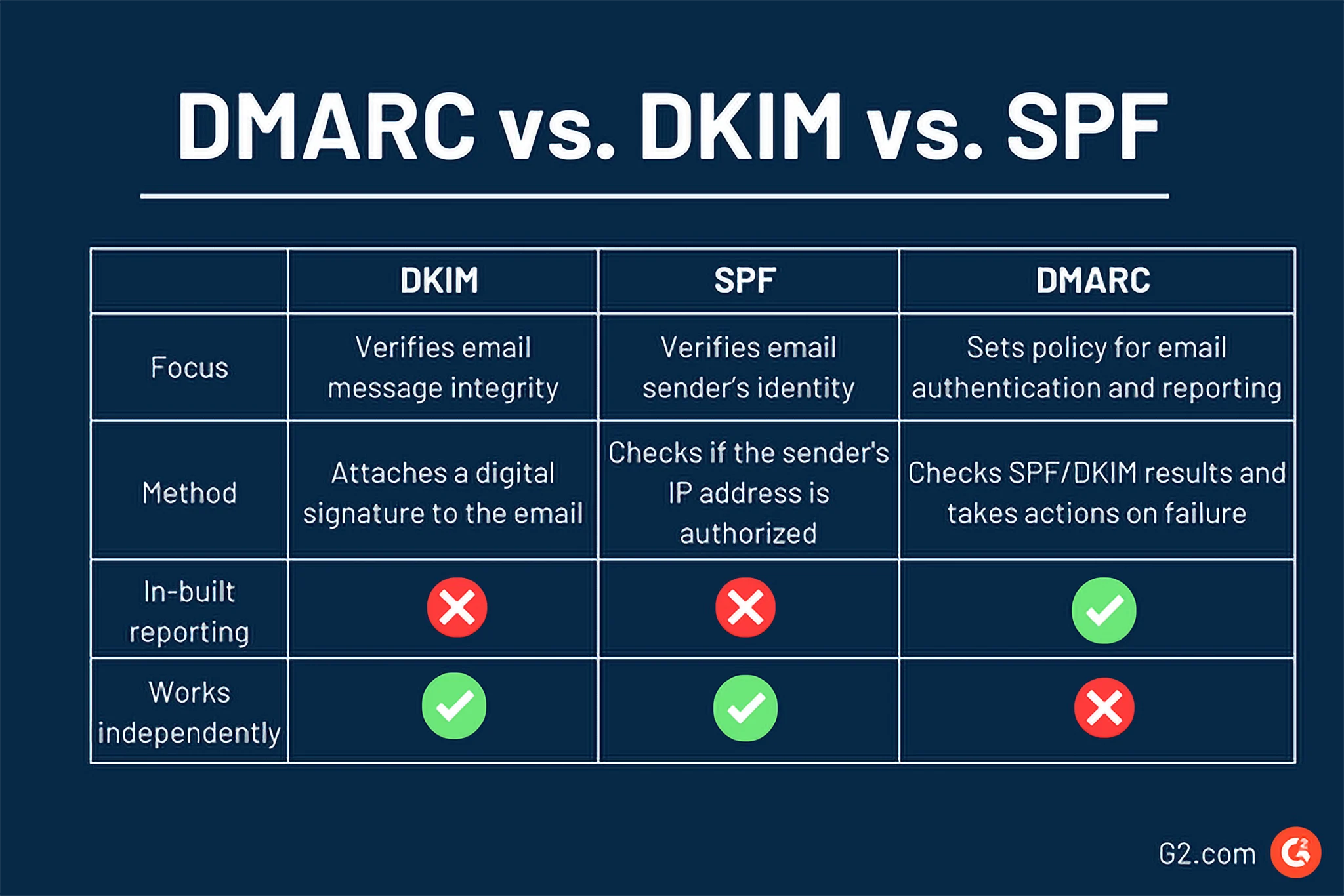
Image source: https://learn.g2.com/dmarc
How to measure email marketing performance
The moment you send an email marketing campaign, you start collecting data.
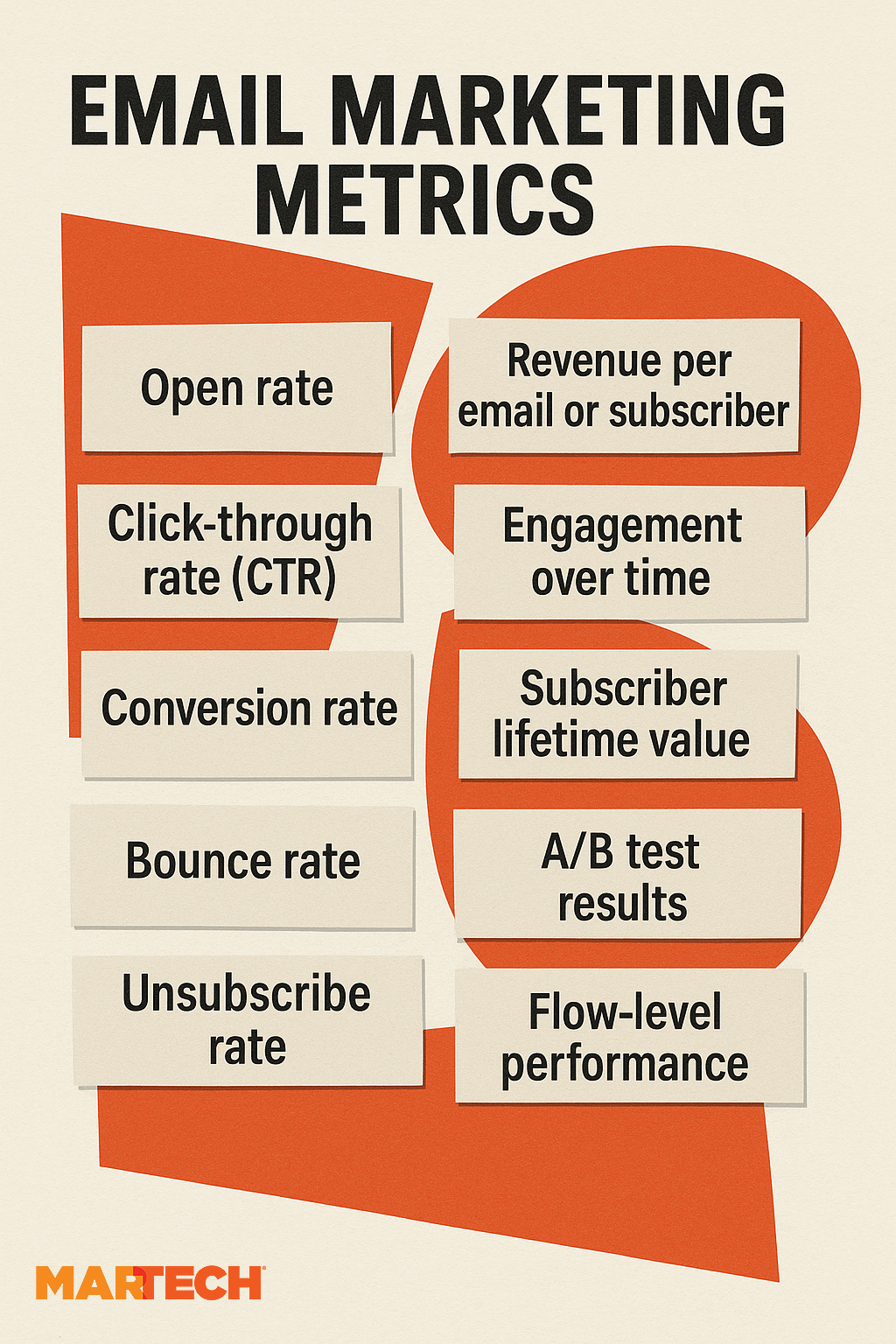
Here are some metrics to help you track email marketing performance.
Core metrics to track
Start by tracking these essential email metrics.
Open rate
Open rate is the percentage of people who opened an email out of the total number of emails sent. While it can be an important benchmark, it’s not always the most reliable.
Here’s why:
One method of tracking open rate is downloading an invisible image. ESPs add a transparent image to every email. When it’s downloaded, it counts as an open.
Open rate has become increasingly unreliable since Apple’s Mail Privacy Protection began pre-loading images. This triggers false opens. Which means open rates are inflated for Apple Mail users.
Plus, subscribers can open emails without engaging with the content. So, open rate isn’t a strong indicator of interest.
Click-through rate
CTR is the percentage of recipients who click on a link in your email. It’s a strong indicator of engagement and interest.
You can use CTR to identify your most engaging products, buttons, and CTAs.
When you know which elements are driving results like increased sales, you can optimize for them. If a particular product always generates sales, then you might include it in email campaigns more frequently.
Conversion rate
Conversion rate is the percentage of recipients who completed a desired action. Like:
- Making a purchase
- Contact your team for a demo or discovery call
- Filling in a contact form
- Signing up to join a webinar
High conversion rates are a key goal. When you know what’s driving them in email, you can reuse the same tactics.
Bounce rate
Bounce rate is the percentage of emails that your ESP couldn’t deliver. Email bounces are split into two categories:
- Soft bounces are temporary delivery failures, usually due to issues such as a full inbox, the recipient’s server being down, or the message being too large. There’s nothing you can do about them. But it’s important to know that multiple soft bounces typically trigger a hard bounce.
- Hard bounces are permanent delivery failures, often caused by an invalid email address or a nonexistent domain. Hard bounces should be removed from your list to protect your sender reputation.
A high email bounce rate is an indicator that your email list is of low quality and that it’s time to clean it. If your emails are consistently failing to send, this can affect your deliverability, causing your emails to land in spam folders.
Unsubscribe rate
Unsubscribe rate refers to the number of recipients who opt out of your list after receiving an email. A high unsubscribe rate can be an indicator that your emails aren’t engaging enough or that they don’t appeal to your audience.
If your unsubscribe rate is high, think about list hygiene, email frequency, and segmentation. These tactics can help ensure you’re sending the right emails to the right people—so you can keep growing your list.
Revenue per email or subscriber
Revenue per email or subscriber is the average amount of revenue generated per email or recipient.
You can use these metrics to identify your best emails and your best customers. Then, you can use the data to optimize your sales emails and segment your list.
Advanced metrics
Once you’re tracking the basics like a pro, start tracking these more advanced metrics, too.
Engagement over time
Engagement over time tracks how subscribers interact with your emails from the time they subscribed to the present day, not just during one campaign.
This metric helps identify:
- Where subscribers become less engaged: An email might have an exceptionally high unsubscribe rate. Or you might spot a pattern in email frequency. Too many emails might put off users rather than encouraging their engagement.
- What subscribers care about: Looking at one email in isolation may not be effective for determining what engages users. Reviewing multiple emails over time enables you to identify patterns in the data.
- How often subscribers engage: Marketing and engagements ebb and flow. You can’t expect every subscriber to be highly engaged with every email. Looking at patterns over time provides a more holistic view of subscriber engagement. For example, you might spot seasonal trends.
Subscriber lifetime value (LTV)
Subscriber LTV measures the total revenue generated by an individual subscriber over the entire time they stay on your list. This metric tells you how valuable your email list is.
Looking at emails in isolation rarely provides a complete picture of the impact of email marketing. Especially when you use email throughout the funnel, often sending them as part of broader campaigns.
Meaningful action doesn’t always happen after sending one email. Instead, it’s the result of many relevant marketing touchpoints.
Pro tip: Subscribers with the highest LTV are most likely your most engaged and loyal customers. Consider setting up a segment and targeting them with loyalty and advocacy content such as reviews, incentivized UGC, or “tell/refer a friend” discounts.
A/B test results
A/B tests reveal what engages users and leads subscribers to take desired actions.
With these experiments, you can figure out what consistently works with your audience. Then, you can improve your email campaigns to improve positive metrics like open rates, CTRs, and conversions.
Pro tip: Test incrementally. If you test too many variables at once, you won’t know what impacted the behavior. For example, change the button color only, and not the text.
Flow-level performance
In addition to tracking individual email performance, monitor how they do in workflows. This helps you understand the role of emails in the customer journey.
For example, your first abandoned cart email might perform poorly because it’s scheduled too soon for your audience. However, if the third email in the sequence typically converts, then you might determine that all the emails in the series are necessary for nurturing subscribers.
Automated email marketing keeps delivering
Email marketing may be one of the oldest digital marketing channels (compared to SMS and social media), but it’s still thriving.
Over the years, email marketing has been tried and tested. We know that high-quality emails sent to engaged email lists work and cold emails sent to bought email lists don’t.
The truth is, creating an email marketing strategy that works takes a lot of work. But once you create the foundation, automated email marketing can continue working for your business while you focus on other tactics or strategies.
For more articles to help develop an email marketing strategy, read:
Read the full article here